.gif)
.gif)
Introduction
Flight prices are among the most volatile consumer prices in the world. A fare can change several times in a day, differ by the passenger's country and vary widely across nearby dates. Because of this volatility, the businesses that build price comparison tools, travel deal sites, corporate travel dashboards and airline analytics depend on fresh fare data. Skyscanner, as a leading travel metasearch engine, is a natural place to start. This guide explains how Skyscanner flight price scraping is typically scoped, what data can be collected for European and US cities, what makes this work technically difficult and which compliance questions to settle first.
For a broader view of how flight, hotel, pricing and availability information can be gathered across travel platforms, see our travel data scraping solutions. This wider context is useful when a project expands beyond airfare into hotel rates, reviews or booking trends.
Why Metasearch Data Is Valuable
A metasearch engine does not sell tickets itself. It collects offers from airlines and online travel agencies and shows them side by side. That gives a data buyer two benefits. First, you see the market's range of prices for the same route and date in one place. Second, you see which airline or agency offers the cheapest option, which is a signal of competition. For a price-comparison start-up, this is the ideal source to prototype with, which is why a first test often begins with a single metasearch platform.
Defining The Input Parameters
In many early-stage projects, the input is simply a list of cities or locations. That is a good start, but flight data needs more precise parameters. A well-defined search specification includes:
Teams comparing collection approaches can also review the Travel Scraping API, which describes structured travel-data extraction and delivery options for flight, hotel, package and rental information.
- Origin and destination: cities or airports, for example London to New York, or Berlin to Madrid. A city can have several airports, so decide whether to search by city code or airport code.
- Trip type: one-way or return.
- Departure and return dates: exact dates, or a flexible window such as the next 60 days.
- Passengers: number of adults, children and infants. Prices change with passenger mix.
- Cabin class: economy, premium economy, business or first.
- Currency and market: the country site or point of sale, since displayed prices can differ by market.
- Filters: direct flights only, maximum stops, baggage included or preferred airlines.
From a list of cities, a route matrix is generated. For example, 20 European cities and 10 US cities can produce hundreds of route pairs, which multiply by dates and trip types.
Route And Date Matrix Planning
Route planning is the main cost driver. Consider a project covering 10 US cities and 20 European cities. Not every pair needs tracking. A practical approach is to select:
- Core routes: high-traffic transatlantic pairs such as major US hubs to major European hubs
- Intra-Europe routes: popular city pairs served by many airlines
- Domestic US routes: the busiest pairs between large cities
- Date windows: the next 30, 60 and 90 days, plus key holiday periods
- Trip lengths: weekend trips, one-week trips and two-week trips
Each combination of route, date and trip length is one search. Daily collection of thousands of searches is feasible, but it must be planned to stay within sensible request limits.
Data Attributes Returned
The core fields for fare data are:
If you need a platform-focused reference alongside this workflow, explore the Skyscanner travel dataset for an example of how travel records can be organized across categories and regions.
- Search context: origin, destination, departure date, return date, passengers, cabin, currency, market and search timestamp.
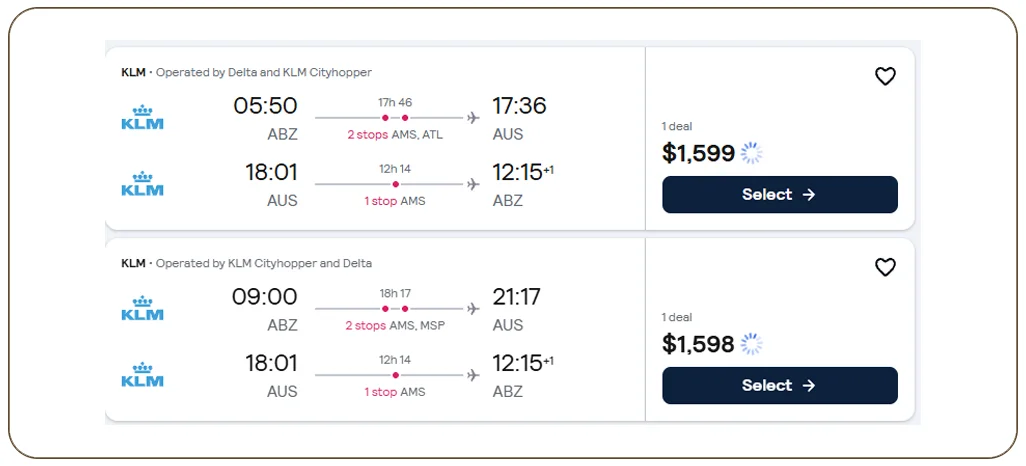
- Itinerary data: airline names, flight numbers, departure and arrival airports and times, duration, number of stops, layover airports and durations, and aircraft type where shown.
- Price data: total price, price per passenger where shown, currency, and whether the price includes taxes and fees.
- Offer data: booking provider (airline or travel agency), deep link or provider name, baggage allowance indications and fare conditions where displayed.
- Ranking and labels: cheapest, fastest or best labels, and the position of the offer in the result list.
- Price trend data: price calendar values and indications of whether prices are rising or falling, where displayed.
About Ratings And Reviews
The requirement mentions ratings and possibly reviews in the future. For flights, ratings are not as central as for hotels or restaurants. What can be shown, depending on the platform, includes airline ratings, ratings of booking agencies, and traveller review summaries for providers. These are usually provider-level, not itinerary-level. If reviews matter to your product, plan them as a separate data stream, collected from sources that publish airline or agency reviews, and joined to fare data by airline code or provider name.
How Daily Fare Collection Works

- Create the search matrix from your cities, date windows, trip types and passenger settings.
- Schedule searches across the day to spread load. Many teams run collection at a fixed time each day so that the time of search is consistent across days.
- Run each search with the exact parameters and wait for results to load fully, because metasearch results usually arrive progressively as providers respond.
- Capture all offers that are displayed, not only the cheapest one, up to a defined depth.
- Standardise fields such as airlines, airports (using IATA codes), durations in minutes and prices as numbers with currency codes.
- Store with timestamps so you can reconstruct how fares change over time for the same route and travel date.
- Quality-check by validating price ranges, itinerary logic and result counts.
- Deliver JSON through an API or files, with stable field names and a schema document.
JSON Delivery Design
A clean JSON output typically groups data into objects: search (parameters and timestamp), itineraries (list of options), each with legs, segments and price, and provider offers (list of booking providers with prices). IATA codes for airports and airlines make it easy to join with other datasets. Prices are numeric, with a separate currency field. Durations are given in minutes. Times are given in ISO format, with local time and time zone offset. Missing values are returned as null.
Delivery can be through a REST API, where your system requests data for a route and date, or as daily JSON files in cloud storage, one file per route or per run.
For teams evaluating another travel platform or planning a multi-source comparison, the Trip.com API is a relevant reference for structured flight and travel data delivered through API-oriented workflows.
Technical Challenges
- Aggressive bot protection: travel metasearch sites invest heavily in preventing automated access, because their data is valuable. Collection needs sophisticated browser automation, session management and pacing, and it requires continuous maintenance.
- Progressive result loading: results appear as providers respond. Collecting too early gives incomplete data.
- Personalised and market-dependent pricing: prices can differ by country site, device, language and sometimes by session. Settings must be fixed and recorded.
- High volume: thousands of searches a day, each with many results, create large datasets.
- Layout changes: the site changes often, which breaks scrapers unless they are monitored.
- Data consistency: the same itinerary may appear with slightly different prices from different providers, which needs careful handling.
- Time sensitivity: since fares change quickly, results should carry accurate timestamps.
Compliance And Terms Of Use: Settle This First
Travel metasearch sites typically restrict automated access in their terms of use, and many provide official partner or affiliate APIs for approved businesses. Before starting a scraping project, you should:
- Read the platform's terms and understand what they permit
- Take legal advice for your use case, especially for commercial products
- Evaluate official routes, such as partner programmes, affiliate feeds or licensed data providers, which can be more stable and clearly permitted
- Decide whether scraping is appropriate for a prototype, a research project or a production service
For many start-ups, a sensible path is to prototype with limited collection to validate the product idea, then move to an official or licensed data source for production.
Use Cases
- Price-comparison start-ups: prototype a fare comparison product and test user demand.
- Travel deal and alert sites: detect fare drops and publish deals.
- Corporate travel and procurement teams: benchmark negotiated fares against market prices.
- Airlines and airports: monitor competitors' fares and route-level competition.
- Travel agencies and tour operators: price packages using real-time fare data.
- Researchers and analysts: study how fares vary with booking window, season and route.
Example: A Deal-Alert Start-Up
A small team plans a deal-alert service for travellers from the US to Europe. It defines 15 US origin cities and 25 European destinations, with date windows for the next 90 days. Daily searches record the cheapest fares for each route and date. The team computes the median fare per route and flags fares more than 30 percent below the median as deals. The prototype validates that users value alerts, and the team then explores an official data partnership to scale.
Example: Booking-Window Analysis
An analyst collects daily prices for 50 routes for the same set of departure dates. She plots price against days before departure. The study shows that prices for transatlantic routes typically move differently from intra-European routes, and that last-minute increases are steeper on some routes. The findings become a public data story.
Metrics You Can Build
- Cheapest fare per route and date over time
- Median fare and price spread for each route
- Number of direct versus connecting options
- Cheapest booking provider share: how often each airline or agency offers the lowest price
- Fare volatility: the number of price changes per day
- Price trend by booking window: the curve of price versus days to departure
Sample Output
A record may include: search timestamp, market, currency, origin, destination, departure date, return date, passengers, cabin, itinerary ID, airline codes, flight numbers, departure time, arrival time, duration in minutes, stops, layover airports, price total, price per passenger, provider, baggage note, label such as cheapest, and result rank.
Data Quality Checks
- Check result counts per route against previous runs
- Validate that arrival times are after departure times and durations are plausible
- Detect and flag price outliers
- Compare a sample of results with the live site on the same day
- Monitor failure rates and layout changes
Delivery And Refresh
Daily collection is a sensible default for fare tracking. More frequent runs, for example every few hours, are possible for a limited route list. Data can be delivered as JSON through an API, as daily files or loaded into a data warehouse.
Responsible Data Collection
Collect only publicly visible fare information, avoid personal data, keep request rates reasonable and follow the platform's terms and applicable laws. Consider official data sources for production use.
Why Choose Real Data API For Flight Price Data
Real Data API helps you scope the route matrix, build a collection process for flight search results and deliver clean JSON with timestamps and stable schemas. We can start with a small test of a few routes and cities to validate the data and the economics before you decide on a larger rollout or an official data route.
Conclusion
Skyscanner flight price scraping can give a price-comparison start-up quick access to daily fare data across European and US routes. With a well-planned route matrix, clean JSON delivery and early attention to compliance and official data alternatives, teams can validate ideas fast and build a durable data strategy.
Planning a flight price data project? Real Data API can scope a test for your cities and dates.
FAQs
Can you collect prices for every city pair in Europe and the USA?
In principle yes, but cost grows quickly with the number of pairs, dates and runs. We recommend starting with a focused matrix.
Can I get the data as JSON?
Yes. JSON through an API or as files is the standard delivery format.
How often should fares be collected?
Daily is common. For deal alerts, several runs a day may be better.
Can reviews and ratings be added later?
Yes, usually from separate sources that publish airline or provider reviews, joined by airline code.
Is scraping Skyscanner allowed?
Check the platform's terms and take legal advice. Official partner APIs may be a better path for production services.
Latest posts
Cashback Rate Tracking for Black Friday 2026: Monitor Competitor Offers & Optimize Promotional Strategies
Skyscanner Flight Price Scraping: Daily Fare Data for European and US Cities
How to Scrape Specific Supermarkets on Instashop: Store-Level Product Data

Luxury Fashion Competitor Data Scraping: Farfetch & Level Shoes Prices, Availability and Catalogue Matching



.png)


