.gif)
.gif)
Introduction
Luxury fashion retail runs on exclusivity, yet the price of a handbag, a pair of sneakers or a designer coat is visible to anyone with a browser. Competing retailers can see each other's prices, ranges and availability in real time. For a luxury retailer with a large catalogue, the question is not whether competitors' data is available, but how to turn it into a usable, matched dataset. This guide explains how competitor data from marketplaces and retailers such as Farfetch and Level Shoes is collected across multiple websites, brands and regions, and how it is matched to a retailer's own product catalogue.
The Business Problem
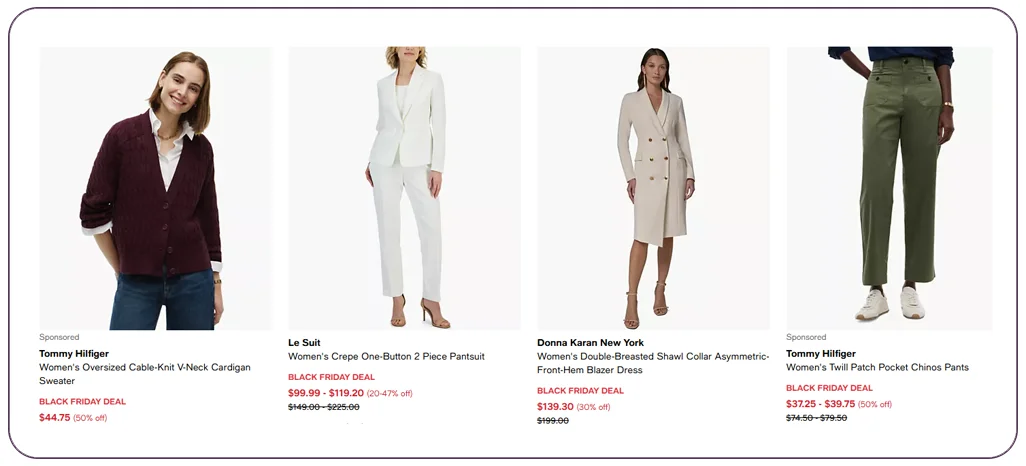
A luxury retailer sells thousands of products from hundreds of brands. Competitors sell many of the same items, often in different countries and at different prices. Merchandising and pricing teams want to answer questions such as:
- For each of our products, who else sells it, and at what price?
- Where are we cheaper, more expensive or unavailable compared with competitors?
- Which products do competitors carry that we do not?
- How do discounts and sale timing differ across regions?
- Which sizes and colours are still available, and which have sold out?
Manually checking is impossible at this scale. Automated competitor scraping, combined with catalogue matching, provides the answers.
For a wider luxury-retail view, luxury goods data scraping can extend collection beyond individual marketplaces to pricing, inventory and assortment intelligence across luxury sources.
Understanding The Two Sources
Farfetch is a global luxury fashion marketplace that connects boutiques and brands with customers in many countries. It shows items from many sellers, with prices that can vary by boutique, region and currency. The same item may be offered by several boutiques, so seller-level data is important.
Level Shoes is a luxury footwear retailer based in the Middle East with a curated range of designer shoes and accessories and its own pricing and promotion strategy. It is a direct competitor for retailers in the regional market.
Together they cover a global marketplace view and a regional specialist view.
Scope: Many Websites, Brands And Regions
The project scope often extends beyond these two sites. A typical setup includes:
- Websites: a list of competitor sites, which may include Farfetch, Level Shoes and other luxury retailers
- Brands: a defined list of brands, usually those sold by the client
- Regions: country sites or shipping destinations, such as the UAE, Saudi Arabia, Europe and the US
- Categories: shoes, bags, clothing, accessories and others
Each combination of site and region can show different prices and availability, so region must be recorded with every record.
Data Fields Collected
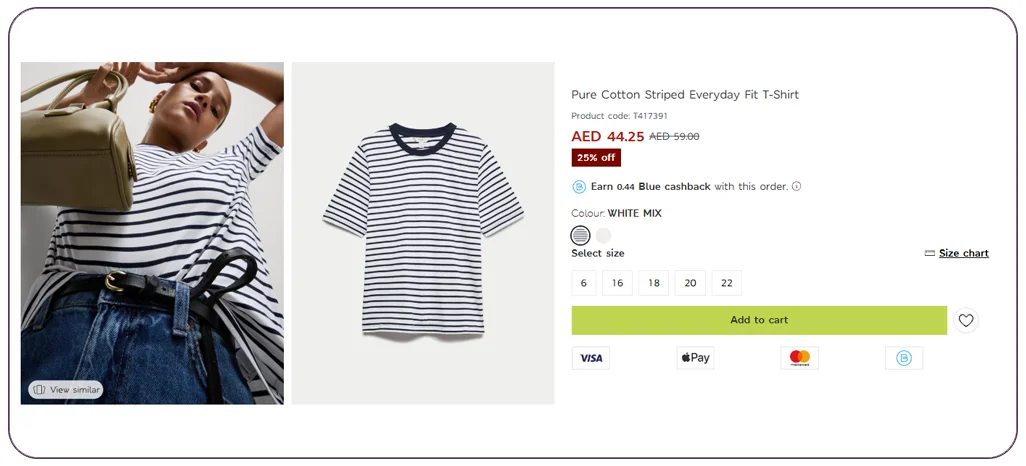
Product identity: brand, product name, style or model code, colour, SKU or product ID on the competitor site, product URL and images.
Category data: department, category, sub-category, season or collection.
Price data: current price, original price, discount percentage, currency and sale label. Whether the price includes tax and duties should be noted where the site says so.
Availability data: in stock or sold out, size-level availability, low stock messages, delivery estimate and shipping destination.
Seller data: for marketplaces such as Farfetch, the boutique or seller name, and seller location where shown.
Product details: material, description, made-in information and measurements where shown.
Context: region, site, language, timestamp and position in the listing.
A broader ecommerce data scraping workflow can provide normalized product records that make cross-site catalogue matching and competitor analysis easier to operationalize.
The Central Task: Product Matching
The most valuable part of the project is matching competitor products to the client's own catalogue. Competitor products carry their own identifiers, names and descriptions. The client's catalogue has its own structure. A reliable match tells you that this item on the competitor's site is the same as that item in your catalogue.
Matching works in layers:
- Brand normalisation: convert brand names into a standard form, for example removing punctuation and accents and mapping known aliases.
- Style code matching: luxury brands often use style or model codes, such as an alphanumeric product code. Where both sides have the code, an exact match is the most reliable method.
- Attribute matching: when codes are missing, match on brand, product type, colour, material and other attributes, using a scoring approach.
- Text similarity: compare product names and descriptions after cleaning.
- Image similarity: for stubborn cases, compare product images using visual similarity as a supporting signal.
- Confidence scoring and review: each match receives a score. High-confidence matches are accepted automatically, and borderline matches go to a review queue for a person to confirm.
The client's catalogue is a powerful starting point because it provides the target structure. It also allows the dataset to include a flag for competitor-only products, meaning items found at competitors that have no match in the client catalogue. These show gaps in the client's range.
Handling Colours, Sizes And Variants
Luxury items often come in several colours and sizes, with each combination treated as its own variant. A match should operate at the right level. The usual model is:
- Style level: brand plus style code or equivalent
- Colour level: the colour variant of a style
- Size level: availability by size
Colour names differ between brands and sites. A colour dictionary maps raw names to standard families, while keeping the original text. Size systems differ too, with European, UK, US and Italian sizes for shoes and clothing. A mapping table converts them to a standard system.
How The Scraping Works
- Define sites, regions and brands. Prepare the list of competitor sites, the region settings and the brand list.
- Build a scraper per site. Each site has its own structure, but all produce the same schema.
- Collect listings by brand and category. Page through all products of the chosen brands.
- Open product pages. Collect variants, sizes, prices, seller and details.
- Set the region. Choose country, currency and shipping destination, and verify they are applied.
- Standardise. Normalise brands, categories, colours, sizes and prices.
- Match to the client catalogue. Run the layered matching process and compute confidence.
- Compute price and availability gaps. For each matched product, calculate the competitor's price versus the client's price, after currency conversion.
- Deliver. Provide a matched dataset, a competitor-only dataset and summary reports.
For recurring price monitoring, retaining timestamps, currencies and historical observations helps pricing teams distinguish temporary promotions from persistent market gaps.
Currency And Price Comparison
To compare prices across regions, prices must be converted to a base currency with a stated exchange rate and date. Differences in tax and duty treatment matter, because some sites display prices including local taxes while others exclude them. A careful project notes the tax treatment for each site and region and avoids comparing mismatched bases without adjustment.
Technical Challenges
- Strong anti-bot protection: luxury and marketplace sites invest in protecting their data, so collection needs careful pacing, rotation and ongoing maintenance.
- Region-specific content: prices, availability and ranges differ by country site, so the region must be set and verified.
- Dynamic pages and heavy imagery: product pages are script-heavy and image-rich.
- Seller variation on marketplaces: the same product from several boutiques has several prices.
- Ambiguous product identity: without style codes, matching depends on attributes and images and carries more uncertainty.
- Frequent price and stock changes: sale seasons cause rapid changes, so refresh frequency matters.
- Catalogue mapping effort: aligning with the client's catalogue requires data cleaning on both sides.
These workflows are especially useful for competitive benchmarking, where matched competitor records can feed pricing, assortment and merchandising decisions.
Use Cases
- Pricing teams: set competitive prices and spot items that are overpriced or underpriced against the market.
- Merchandising and buying teams: identify products and brands that competitors carry and the client does not.
- Promotion planning: track the timing and depth of competitor discounts by region.
- Inventory teams: use competitor stock-outs as a demand signal.
- Brand relationship teams: check that partner brands' prices are consistent across retailers.
- Analysts: study luxury market positioning, price tiers and assortment overlap.
Example: Weekly Competitor Price Index
A luxury retailer matches 25,000 of its products to competitor listings across four sites in three regions. Each week, the pipeline updates competitor prices and availability. The pricing team views a price index for each brand and category, showing the share of products where the retailer is the cheapest, within 5 percent, or more than 5 percent above the market. When a major competitor starts a sale, the team sees the effect within a day and can respond.
Example: Range Gap Analysis
The buying team uses the competitor-only list to find products from key brands that competitors sell but the retailer does not. After filtering by price tier and stock status, the team shortlists items for the next buying round.
Sample Output
A matched record may include: client SKU, client price, competitor site, region, competitor product ID, competitor URL, brand, style code, colour, competitor price, competitor original price, discount percent, currency, converted price, price gap percent, availability, sizes available, seller, match method, match confidence, review status and timestamp. A competitor-only table has the same competitor fields without a client SKU.
Data Quality Checks
- Measure the share of products matched at each confidence level
- Review a sample of high-confidence matches manually
- Check that price gaps are plausible and investigate extreme outliers
- Compare product counts per brand and site with previous runs
- Verify region and currency settings for every run
Teams that need ongoing feeds can use a real-time product data pipeline alongside scheduled exports to keep price and availability observations current.
Delivery And Refresh
The dataset can be delivered as CSV, Excel, Parquet or JSON, or through an API, or loaded into a data warehouse and BI tool. Weekly collection is common for price indexes, and daily collection during sale periods. Initial matching takes the most effort. Later runs mostly update prices and availability.
Responsible Data Collection
Collect only public product and price information, avoid personal data, keep request volumes reasonable and follow each site's terms and applicable laws, including competition law considerations when using competitor pricing data. Product images and descriptions are protected, so check usage rights. Take legal advice for commercial use.
Why Choose Real Data API For Luxury Competitor Data
Real Data API builds site-specific scrapers across regions, maps competitor products to your catalogue with a layered, auditable matching process and delivers matched and competitor-only datasets. A pilot with a few brands and two competitor sites shows match rates and data quality before you scale.
For broader fashion market coverage, retailers can also combine fashion data scraping with competitor price monitoring to track pricing, availability and assortment changes across multiple fashion sources.
Conclusion
Competitor data from Farfetch, Level Shoes and other luxury sites becomes truly useful once it is matched to your own catalogue. With region-aware collection, layered matching and clear confidence scores, pricing and merchandising teams can see exactly where they stand and act on it quickly.
Need matched competitor data? Real Data API can deliver a pilot for your brands and competitor sites.
For teams building a broader pricing intelligence workflow, an ecommerce scraping API can complement the matched catalogue by providing structured product, price and availability data for additional marketplaces.
FAQs
Can you match products to our catalogue without style codes?
Yes, using brand, attributes, text and image similarity, though match confidence is lower. Style codes give the best results.
Can you include competitor-only products?
Yes. Unmatched competitor items are delivered in a separate table.
Do you collect size-level availability?
Where the site shows it, yes.
How do you handle different regions?
Each run sets the region, currency and shipping destination, and these are stored with each record.
How often should we refresh?
Weekly for price indexes, and daily during sale seasons.
Latest posts
Cashback Rate Tracking for Black Friday 2026: Monitor Competitor Offers & Optimize Promotional Strategies

Skyscanner Flight Price Scraping: Daily Fare Data for European and US Cities
How to Scrape Specific Supermarkets on Instashop: Store-Level Product Data

Luxury Fashion Competitor Data Scraping: Farfetch & Level Shoes Prices, Availability and Catalogue Matching



.png)


