.gif)
.gif)
Introduction
On a quick-commerce app, most purchases start with a search. A shopper types almonds, badam or makhana and picks from the first few results. That makes search rank, sponsored placement and price at the top of results crucial for brands in categories like dry fruits, nuts and seeds, where dozens of brands compete for the same keywords. Blinkit search scraping captures what shoppers see for a defined list of keywords, in defined locations, at defined times. This guide explains how a keyword-based search project is set up for dry fruits, nuts and seeds, including Hindi search terms, a depth of the first two result pages and a set of Delhi pincodes.
Why Search Data Matters
For teams that need this workflow at scale, the Blinkit API can provide structured search, product, price, stock and delivery data, making it easier to feed quick-commerce intelligence into dashboards and recurring reports.
In this category, search results show:
- Which brands win visibility for each keyword
- How sponsored placements are used and by whom
- Price positions of products appearing at the top
- Pack sizes and variants that dominate
- Availability at the moment of search
- Differences between English and Hindi searches, since shoppers use both
For a brand, this is the equivalent of watching the shop window at different times and in different neighbourhoods.
Keyword Strategy For Dry Fruits, Nuts And Seeds
The keyword list is the core input. For this category, it commonly includes:
- English generic terms: almonds, cashews, pistachios, walnuts, raisins, dates, figs, mixed dry fruits, nuts, seeds, chia seeds, pumpkin seeds, sunflower seeds, flax seeds, fox nuts
- Hindi and transliterated terms: badam, kaju, pista, akhrot, kishmish, khajoor, anjeer, makhana, mungfali, chironji, and mixed terms for dry fruit mix
- Variants and modifiers: california almonds, roasted, salted, raw, organic, premium, gift pack, 500 g, 1 kg
- Brand terms: names of your brand and competitors, to see how they rank for branded searches
Spelling variants matter. Hindi words written in Latin letters have several common spellings, for example kishmish and kismis, or khajoor and khajur. The search list should include the main variants, and the results can be grouped under a standard keyword for analysis.
Search Depth: The First Two Pages
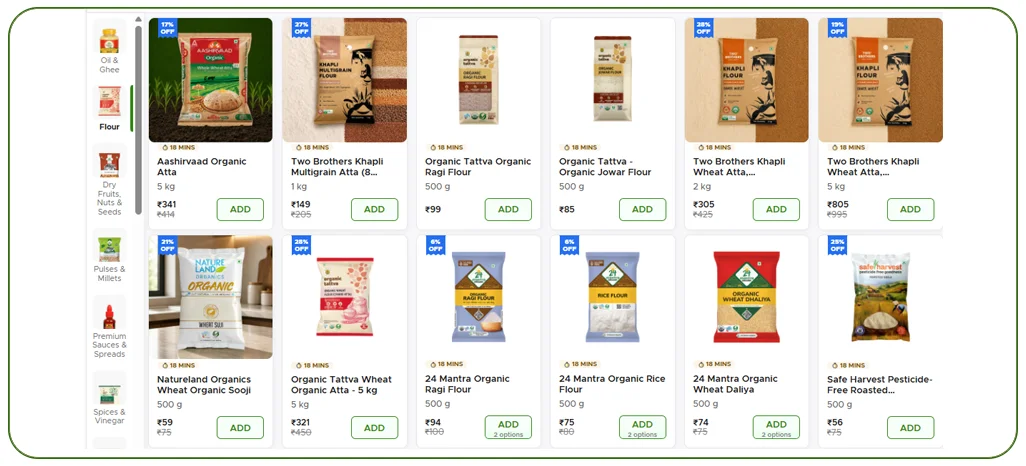
The project covers the first two pages of results per keyword, which is about 30 to 40 products. That depth reflects how shoppers behave: most never scroll beyond the first screens. For each keyword and location, the scraper loads the results, scrolls to the end of the second page and records every product in order.
Locations: Pincodes 110017 To 110027
This pincode-level approach also aligns with broader pincode-wise product price scraping, where location-specific pricing and availability can be compared across neighborhoods instead of relying on city-level averages.
The pincode range 110017 to 110027 covers eleven pincodes in South and Central Delhi. Because search results and availability depend on the nearest dark store, using several pincodes shows how rankings and stock differ across the area. Some pincodes will be served by the same store and show identical results, which is itself a finding. The pincode is recorded with every row.
The Volume Calculation
As an illustration, 40 keywords across 11 pincodes with about 35 products per search gives around 15,400 rows per full run. With English and Hindi variants, the number of keywords can grow. If a run takes place several times a day, volume increases accordingly. Planning for volume early keeps costs predictable.
Data Fields
The typical fields for each row are:
- Keyword used and its standardised keyword group
- Pincode
- Search rank: position of the product in the results, counting across pages
- Page number
- Product name, brand, variant and pack size
- Price: selling price and MRP, with discount percentage
- Unit price: price per 100 g or per kg, calculated from the pack size
- Availability: in stock or out of stock, and any limited-stock message
- Product URL
- Sponsored or organic flag, wherever the app shows it
- Collection date and time
- Delivery time shown for the pincode, if displayed
Sponsored Versus Organic Listings
Retail media is a growing part of quick commerce, and sponsored listings appear at the top of search results. The app marks them with a label. The scraper reads the label and stores a sponsored flag. That lets you calculate:
- Share of sponsored slots in the top results
- Which brands pay for visibility on which keywords
- Organic rank of products, separate from sponsored rank
- How the sponsored share varies by keyword, pincode and time of day
If a label is not visible for a particular listing, the flag is stored as unknown, not as organic, to avoid false conclusions.
Delivery Format: One File Per Run
The requested format is Excel or CSV with one file per run. A tidy file structure helps:
- File naming: include the date, time, platform and category in the name
- One sheet or table per run: with consistent columns
- A summary sheet with the number of keywords, pincodes and rows, and any failed searches
- A keyword dictionary that lists standard groups and their variants
Analysts can then stack files over time to see trends.
How The Scraping Works
If the same workflow needs to cover wider grocery catalogs, it can be extended through grocery data scraping with standardized fields, locations and refresh schedules.
- Prepare the keyword list and the pincode list.
- Set the pincode in the app and verify that it is applied.
- Run each keyword search and wait for results to load.
- Scroll through the first two pages and record each product in order, with its flags.
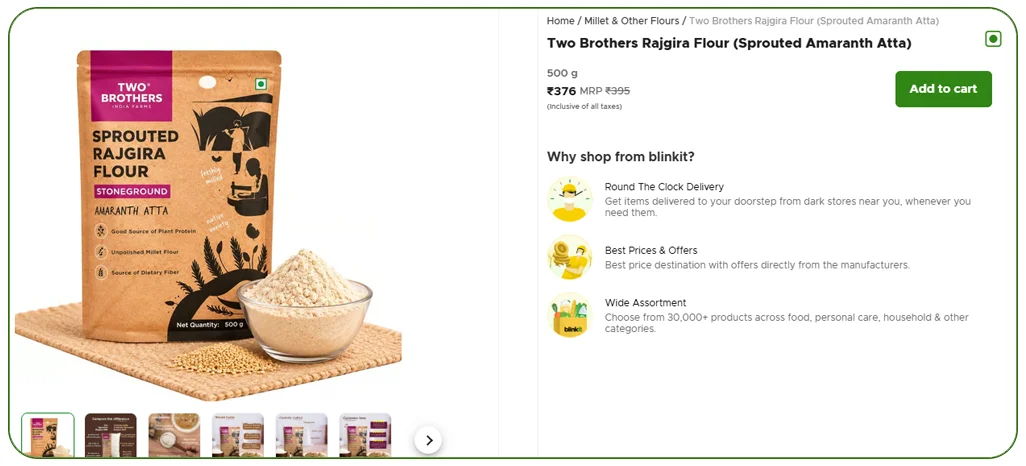
- Capture the product fields shown on the result card, and open product pages only if more detail is needed.
- Standardise names, units and keywords, and calculate unit prices.
- Validate the number of results per search, price formats and rank continuity.
- Write the file for the run and deliver it.
Technical Challenges
- App-first platform: Blinkit is app-centric, so collection often relies on mobile endpoints or advanced browser emulation, which need maintenance.
- Dynamic results: search results load as the user scrolls, so scraping must continue until the two pages are complete.
- Personalisation and variation: results can differ by time, user session and stock, so repeated runs are useful.
- Pincode accuracy: the correct location must be applied and verified for each search.
- Hindi and mixed-language queries: search behaviour for transliterated terms can be less predictable, with some terms returning broad results.
- Sponsored labels: their position and format can change, so the extractor must be updated.
- Rate limits and blocking: 15,000 or more rows per run requires careful pacing.
Use Cases
- Dry fruit and nut brands: track share of search, rank for key terms and competitor price positioning.
- Retail media and ad teams: see where sponsored spend goes and measure the share of voice.
- Category managers: understand which pack sizes and prices dominate the top results.
- Supply chain teams: link stock-outs of top-ranked products to lost visibility.
- Market researchers: study how Hindi and English searches differ in the results they show.
Example: Tracking Share Of Search
A dry-fruit brand tracks 30 keywords across 11 pincodes twice a day for four weeks. It calculates share of search, defined as the percentage of top-10 slots that its products hold for each keyword. The data shows that the brand ranks strongly for its core term but is largely absent for the Hindi term for a popular nut, where two competitors hold most sponsored and organic slots. The brand adds Hindi keywords to its advertising plan and optimises its product titles.
Example: A Price-Position Study
A category manager uses the data to compare unit prices of top-ranked products for almonds. She finds that the cheapest options are not the highest ranked and that sponsored products tend to have mid-range unit prices. The insight guides her pricing and pack-size decisions.
Sample Output
A row may include: run date and time, platform, pincode, keyword, keyword group, rank, page, product name, brand, variant, pack size, selling price, MRP, discount percent, unit price per 100 g, availability, sponsored flag, delivery time and product URL.
Data Quality Checks
- Every keyword and pincode combination should return results, or be flagged as failed
- Ranks should be continuous with no gaps
- The number of results per search should fall within the expected 30 to 40 range, with exceptions explained
- Prices should be numeric, and MRP should not be lower than the selling price
- A manual sample should be checked against the live app
Delivery And Refresh
Files can be delivered by cloud storage link, email or API, with one file per run. Typical schedules are once or twice a day. Higher frequency is possible for a limited keyword set during festivals such as Diwali, when dry fruit gifting increases sharply.
Responsible Data Collection
Collect only publicly visible search and product information, avoid personal data, keep request volumes reasonable and follow the platform's terms and applicable laws.
Why Choose Real Data API For Blinkit Search Scraping
For broader marketplace programs, the same data pipeline can also support eCommerce data scraping across multiple retailers and marketplaces.
Real Data API builds pincode-aware, keyword-driven search scrapers that capture rank, price, availability and sponsored flags in tidy files. A pilot with 10 keywords and 3 pincodes helps you validate the structure before a full run.
Conclusion
Blinkit search scraping gives dry fruit, nut and seed brands a precise view of what shoppers see for the keywords that matter, in English and Hindi, across chosen pincodes. With clear search rank, sponsored flags and clean files for every run, brands can optimise visibility, pricing and advertising with data.
Need quick-commerce search data? Real Data API can deliver a pilot for your keywords and pincodes.
FAQs
Can you include Hindi and English keywords in the same run?
Yes. Both are included, and variants are grouped under standard keywords for analysis.
How do you identify sponsored listings?
By reading the sponsored label shown in the app. If it is not visible, the flag is stored as unknown.
Can I add more pages than two?
Yes. Depth can be increased, though cost and run time grow with it.
Can I get the data more than once a day?
Yes. Multiple runs per day are possible, with one file per run.
Can you also capture product details beyond the search card?
Yes. Product pages can be opened for descriptions and additional fields.
Latest posts
Stock Availability Monitoring with WhatsApp Alerts: Tracking High-Demand Electronics Across Blinkit, Zepto, Flipkart and Instamart
Cyber Week Stock Tracking in 2026: How Meesho Monitor Product Availability and Restocks in Real Time
How to Scrape Amazon Fresh Grocery Delivery Data in 2026 - How to Monitor Competitor Prices and Protect Grocery Retail Profit Margins
Quick Commerce Data Scraping - Tracking Blinkit, Zepto and Instamart During New Year 2026



.png)


