Introduction
Menus are the most detailed public record of what a restaurant sells and for how much. Every dish name, description, price, add-on and combo tells you something about positioning, margins and customer demand. When you collect menus for thousands of restaurants across a city, you can measure price levels, find assortment gaps, benchmark competitors and train recommendation systems. The two richest sources in India are Zomato and Swiggy. This is a complete guide to restaurant and menu data scraping from both.
We cover what you can extract, how the process works from start to finish, the technical difficulties you will face, how to clean menu data so that it is analysable, and how different teams put it to use.
What Restaurant And Menu Data Includes
Restaurant level
- Name, brand, outlet address, locality, city, pincode and coordinates
- Cuisine tags, restaurant type such as dine-in, cloud kitchen or cafe
- Rating, review count and popularity labels
- Price-for-two, delivery time estimate and delivery fee
- Opening hours and current open or closed status
- Offers and discounts displayed on the restaurant page
Menu Level
- Category or section names such as starters, mains, beverages and desserts
- Item name and description
- Price and any discounted price
- Veg, non-veg or egg indicator
- Bestseller or recommended tags
- Item images
- Variants such as size or portion, with separate prices
- Add-ons and customisation options with extra charges
- Combos and meal deals
Zomato Vs Swiggy: What Is Different?
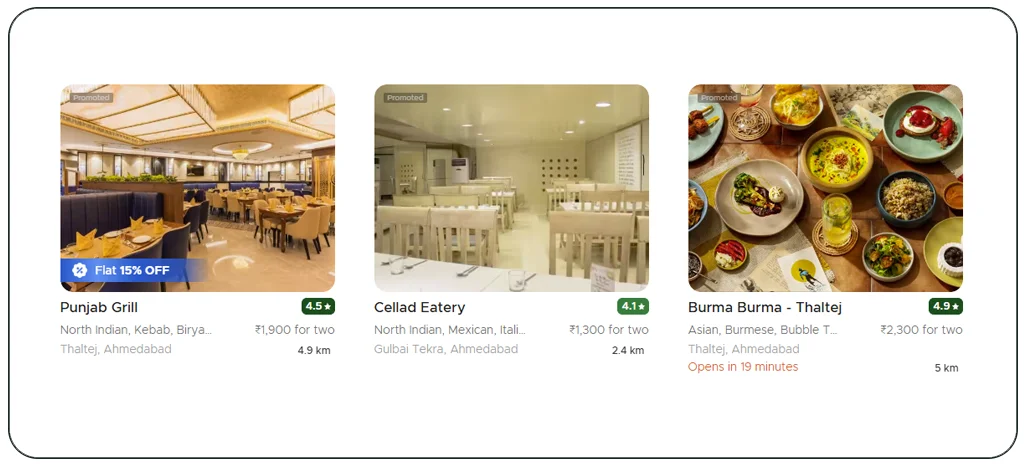
Both platforms show similar data but present it differently. Zomato has a strong discovery and dining-out side, with rich restaurant profiles and reviews, and also offers delivery menus. Swiggy is delivery-first, and its menu pages are structured around ordering, including add-ons and customisation. The same restaurant may have different menu prices on the two platforms because commissions and offers differ. If your goal is price intelligence, collecting from both is essential.
Step-By-Step Scraping Workflow
- Define the geography. Select cities and localities or pincodes. Since results depend on the delivery location, you will run the process from many points across a city.
- Collect the restaurant list. For each location, page through the restaurant listing, using all sort orders, filters and collections to reach every outlet.
- Build a restaurant master. De-duplicate and assign each outlet a unique ID.
- Open each restaurant page. Collect the restaurant details and the full menu.
- Expand menu sections. Many menus load sections on demand. The scraper expands each one to capture every item.
- Capture variants and add-ons. Open item customisation panels to record sizes and extra charges.
- Clean and standardise. Normalise item names, categories and sizes.
- Match across platforms. Link restaurants that appear on both Zomato and Swiggy, and link equivalent items.
- Validate and deliver. Run checks on missing prices and unusual values, then deliver by file or API.
Cleaning Menu Data
Raw menu data is messy. Without cleaning, analysis becomes unreliable. Key tasks include:
- Category harmonisation: map hundreds of section names such as Chef Specials, Must Try and Combos into a standard list like Starters, Main course, Breads, Rice, Beverages and Desserts.
- Dish normalisation: map variants of the same dish, such as Paneer Butter Masala, Paneer Makhani and Paneer Butter Masala Full, to one dish family.
- Size and portion handling: capture half and full portions, small, medium and large, or quantity in pieces.
- Price type separation: record base price, discounted price and add-on cost separately.
- Diet tags: standardise veg, non-veg and egg flags.
- Duplicate and promotional items: remove duplicates that appear in several sections.
Technical Challenges
- Scale: a large city can have tens of thousands of outlets, and each can have hundreds of menu items. A full scrape can reach millions of rows.
- Dynamic and app-driven content: menus load through scripts and mobile endpoints that change frequently.
- Anti-bot controls: platforms limit abnormal traffic. Collection needs pacing, rotation and monitoring.
- Location variance: the same restaurant can show different menus or fees for different delivery addresses.
- Frequent menu changes: restaurants update items and prices often, so freshness matters.
- Image and text quality: some descriptions are short or missing, and some items have no price until options are selected.
Use Cases
- Restaurant groups and cloud kitchens: benchmark prices and portion sizes against competitors in the same area.
- Food-tech startups: build recommendation engines, dish search and menu-based analytics.
- Ingredient and equipment suppliers: infer demand from menu composition, for example the number of restaurants serving a given dish type.
- Investors and consultants: estimate market structure, price bands and category growth.
- Aggregators and price-comparison tools: compare delivery prices between platforms.
- Academic researchers: study food culture, pricing and health labelling.
Example: Price Benchmarking For A Biryani Brand
A biryani brand wants to price its new city launch. It scrapes menus for biryani restaurants within a five-kilometre radius of its planned outlet on both platforms. It compares the price of chicken biryani in full and half portions, delivery fees and typical offer levels. The analysis shows a median price band and a gap between premium and budget players, helping the brand choose a price that fits its positioning.
Example: Finding Dish Trends
A food-tech startup scrapes menus from 5,000 restaurants and counts the frequency of dishes by locality over six months. It finds that some healthy bowls and millet-based dishes are growing quickly in specific neighbourhoods. The startup uses the insight to advise restaurant clients on menu changes.
Sample Data Structure
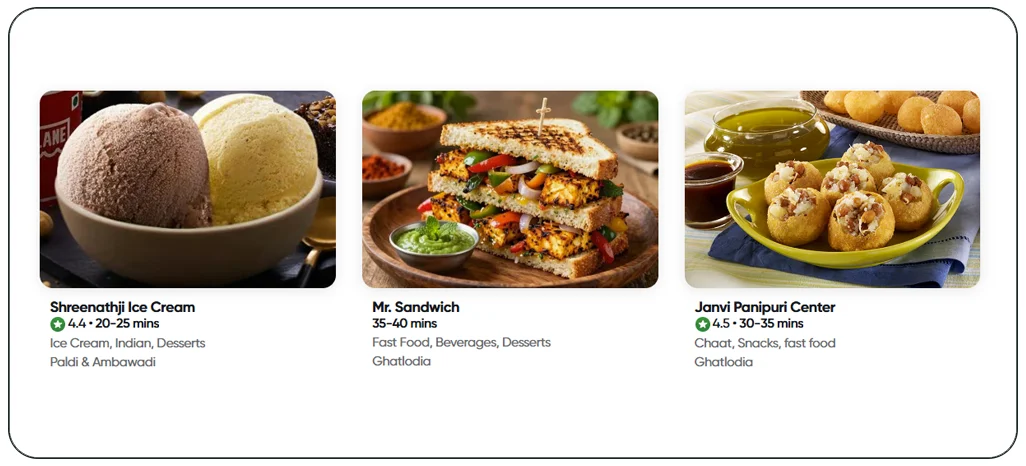
A clean structure usually has several tables. A restaurant table holds the outlet details. A menu item table holds one row per item, with restaurant ID, category, dish name, price, diet tag and flags. A variant table holds sizes and portions. An add-on table holds extras and prices. An offer table holds restaurant-level offers. Each table carries a source and a timestamp. This design makes it easy to analyse by dish, by restaurant or by locality. The same structure can also feed broader food datasets used for restaurant and delivery-market analysis.
Delivery Formats And Refresh Frequency
Options include CSV or Excel for one-time projects, JSON API for applications and direct loads into a data warehouse for analytics teams. A monthly refresh is common for full menus, while price monitoring for a selected set of restaurants may be weekly or daily.
Responsible Scraping
Collect only public information, avoid personal data, keep request rates reasonable and follow platform terms and local laws. Be aware that menu images and descriptions may be protected by copyright, so check usage rights before republishing.
Why Choose Real Data Api For Menu Data Scraping
Real Data API builds location-aware scrapers for Zomato and Swiggy, expands menus fully, cleans and standardises items, and delivers structured data in the format you need. We can begin with a pilot for one locality to demonstrate quality, coverage and speed.
Conclusion
Restaurant and menu data scraping from Zomato and Swiggy provides a detailed foundation for pricing, product and market decisions in food. With full menu expansion, careful cleaning and cross-platform matching, the data becomes accurate and ready for analysis, whether you run a restaurant group or build a food-tech product.
Need restaurant and menu data? Real Data API can deliver a pilot for your city and cuisine.
FAQs
1. Can you extract menu data for every restaurant in a city?
We can cover all outlets listed on the platforms for the locations you choose. The exact count depends on listings.
2. Do prices on Zomato and Swiggy differ?
They can differ for the same restaurant. Collecting both lets you compare.
3. Can I get add-ons and variants?
Yes. These are captured by opening item customisation options.
4. How do you keep menu data up to date?
Through scheduled re-collection. The frequency depends on your needs and budget.
5. Can I get reviews as well?
Review text is possible in some projects, but it needs separate consideration for volume and usage rights.
Latest posts
India Seller-Level Information API for Electronics: Apple SKUs on Amazon, Flipkart, Croma, Vijay Sales & Reliance Digital
Multi-City Quick-Commerce Data Feed for Zepto and Swiggy Instamart
Blinkit Data Scraping Bangalore: Packed Grocery SKU, Price & Stock
Indian Quick-Commerce Grocery Category Data: Staples, Snacks & Beverages Across Blinkit, Zepto and Instamart



.png)


