.gif)
.png)
Introduction
Quick commerce has changed how India buys groceries, snacks and daily essentials. Prices, availability and offers on Blinkit, Zepto and Swiggy Instamart can differ from one neighbourhood to the next. For FMCG brands, aggregators and analysts, that makes accurate, location wise data one of the most valuable (and hardest to collect) datasets in retail.
Why quick-commerce data is different
Unlike a normal e-commerce site, these apps show a catalogue based on the delivery location. Each location is served by a nearby dark store, so the same product can be in stock, out of stock or priced differently depending on where the customer is. A national average hides most of what matters.
What data can be extracted
Choosing the right platform-specific data source
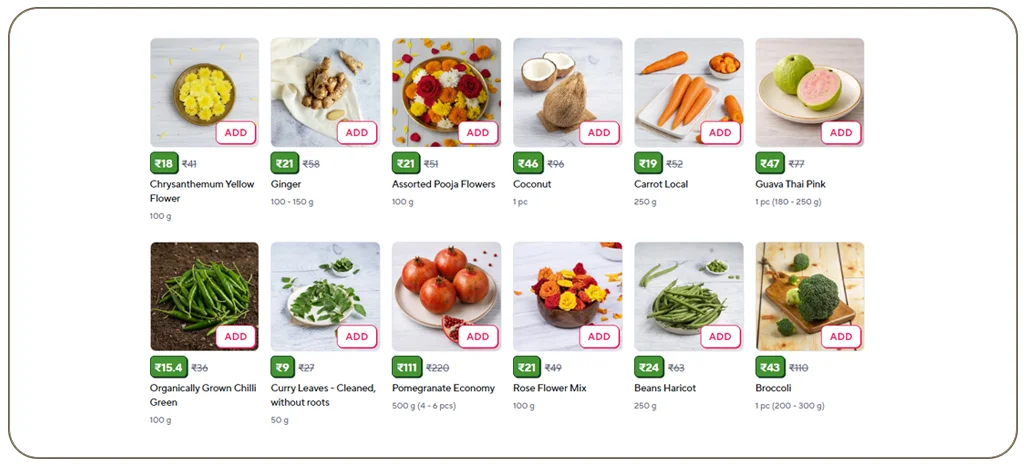
The exact fields you need will depend on the platform and the business question. For Blinkit, the Blinkit grocery dataset can help teams assess available product, pricing and stock fields. For cross-platform analysis, compare it with the Zepto and the Swiggy. Before collecting data, define a shared field list—such as brand, pack size, selling price, MRP, discount, stock status, pincode and capture timestamp—so that products can be compared consistently.
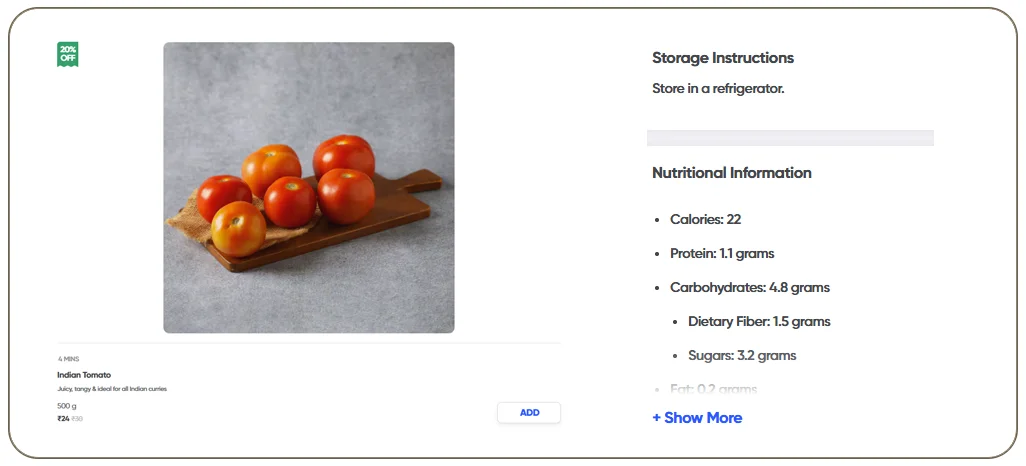
- Product name, brand, category and sub-category
- Pack size, MRP, selling price and discount percentage
- In-stock / out-of-stock status
- Delivery time promise and delivery fee where shown
- Ratings, product images and search ranking position
- Sponsored vs organic placement
Scraping at city and dark-store level
For teams comparing several retailers, a structured grocery dataset can make product matching and price benchmarking more consistent across brands, pack sizes and locations. See our guide to scraping grocery data from Zepto, Blinkit and Swiggy Instamart.
The approach is to simulate a customer in a chosen location (by pincode or coordinates), load the category pages, and capture each SKU's details. Repeating this across a list of locations gives you a city-wise and dark-store-wise view. Multi SKU tracking works the same way: you provide a list of product IDs or names and receive a refreshed feed on a schedule.
Business use cases
- Price benchmarking: compare your SKU's price against competitors on all three apps.
- Availability monitoring: spot stock-outs by city and trigger supply-chain action.
- Assortment gaps: see which competitor SKUs are listed where you are absent.
- Promotion tracking: measure how often and how deeply rivals discount.
Challenges to plan for
These platforms are mobile-first, change layouts often and apply rate limits. A reliable pipeline needs location handling, rotating infrastructure, monitoring for layout changes and clean-up of duplicate or mismatched SKUs.
If your workflow needs repeatable location-specific feeds rather than one-off exports, a grocery scraping API can help standardize product, price and availability fields for downstream analysis.
Delivery formats
Plan the data refresh around the decision
Refresh frequency should match how quickly the underlying decision can change. Daily collection may be sufficient for assortment coverage, while promotional monitoring or short-lived stock changes may require more frequent checks. Agree on the target cities, pincodes, SKU list, fields, refresh cadence and delivery format before scaling. If you are evaluating different platform integrations, this quick-commerce API comparison guide provides additional context on extracting data across multiple services.
Data can be delivered as a scheduled API, JSON/CSV files, or pushed into your cloud storage or BI tool, hourly, daily or weekly.
How a quick-commerce data pipeline works
- Define the scope: list the cities, pincodes, categories and competitor brands that matter to you.
- Set the location: the scraper opens the app or site as a customer would in each chosen location, so the right dark-store catalogue loads.
- Extract: category pages, search results and product pages are read for every SKU, with price, stock and offer details.
- Clean and match: the same product is often named differently across apps, so SKUs are matched using brand, pack size and product identifiers.
- Deliver and monitor: the output is sent to you on a schedule, and a monitoring layer flags layout changes or sudden drops in record counts.
Key metrics you can build from quick-commerce data
- Availability rate: the share of tracked SKUs in stock in each city or dark store
- Price index: your average price compared with competitors for the same pack size
- Discount depth and frequency: how often a competitor discounts and by how much
- Share of search: how often your products appear in the first results for a keyword
- Delivery time trends: the promised delivery window by area and time of day
Example: tracking a snacks brand across three cities
Turning location-level data into practical decisions
The same method can support assortment planning and service-area research, not just price comparisons. For example, teams can compare which SKUs appear across delivery zones, identify recurring stock gaps, and prioritize locations for replenishment or promotions. Real Data API has also published a hyperlocal grocery intelligence case study describing how location-specific grocery signals can support operational decisions. Use these insights alongside internal sales and inventory data rather than treating app listings as a direct measure of actual sales.
Imagine a snacks brand that sells in Mumbai, Bengaluru and Delhi NCR. By collecting data twice a day from Blinkit, Zepto, Instamart the brand can see that a 150 g pack is out of stock in several Bengaluru dark stores on weekends, while a competitor runs a deeper discount on the same pack in Delhi NCR. The sales team can fix replenishment in one city and respond to the promotion in another, instead of waiting for a monthly report.
Why choose Real Data API for quick commerce data scraping
Quick-commerce platforms change often, so a one-time script rarely survives. Real Data API builds and maintains custom scrapers, handles location setup and keeps the output structure stable. For platform-specific workflows, explore the BlinkIt and Zepto Scraper or the Swiggy API, which includes Instamart grocery data options. Your analysts can focus on insights rather than repairing broken data. Start with a small sample covering a few SKUs and cities, then scale once the quality is confirmed.
FAQs
Data quality and responsible collection
Location-specific results can change with delivery address, time, inventory and app presentation. Store the capture timestamp and location identifier with every record, normalize units and pack sizes, and flag missing or unusual values before reporting. Collect only the information needed for your analysis, review each platform's terms and applicable laws, and avoid personal or private user data.
1. Can I get data for a specific dark store?
Yes, by mapping dark-store coverage to pincodes or coordinates.
2. How often can data be refreshed?
From near real-time to daily, depending on volume and need.
3. Is it legal to scrape quick-commerce platforms?
Collecting publicly visible product and price information is common for market research, but each platform has its own terms of use. Review the terms and local laws for your use case, and avoid collecting any personal or private user data.
4. Can I track my own products and competitors together?
Yes. Most clients track their own SKUs plus a list of competitor SKUs in the same category, so price and availability can be compared side by side.
5. What format is the data delivered in?
JSON through an API, CSV or Excel files, or direct delivery into cloud storage or a database.
6. How long does setup take?
A small sample is usually quicker than a full production feed. The timeline depends on the number of cities, SKUs and the refresh frequency.
Conclusion
Quick Commerce Data Scraping gives FMCG brands, aggregators and analysts a clear, location-wise view of price, stock and promotions on Blinkit, Zepto and Swiggy Instamart. With the right pipeline, city and dark-store level data becomes a daily decision tool rather than a monthly report.
Need quick-commerce data for your brand? Real Data API builds custom feeds for Blinkit, Zepto and Instamart. Explore the Blinkit Scraper, Instamart Scraper and relevant grocery dataset. Request a free sample.
Latest posts
Zomato & Swiggy Restaurant Data Scraping: Menu, Cuisine, Address & Dine-In Offers
How to Scrape Blinkit, Zepto & Swiggy Instamart Data (City & Dark-Store Wise)
Walmart, Costco & Whole Foods Grocery Data Scraping: Pricing, Nutrition, Ingredients & Store Availability
Google Maps Business Data Scraping: City-Wise Leads & Multi-Country POI Data






.png)



